老师麻烦看一下我的代码,我的video.currentTime值变化后又变成0了
HTML 代码
<!DOCTYPE html>
<html lang="en">
<head>
<meta charset="UTF-8">
<title>视频播放器</title>
<link type="text/css" rel="stylesheet" href="css/videoStyle.css" />
<script type="text/javascript" src="js/videoJs.js" defer></script>
</head>
<body>
<div class="videoBox"> <!--视频播放器整个盒子-->
<video id="myVideo"> <!--插入我的视频-->
<source src="videos/iPhoneXS.mp4" type="video/mp4" />
</video>
<div class="topBox"> <!--顶部盒子,里面装有一个标题及右边的倍速按钮-->
<div class="name">钢铁侠4</div>
<div class="speedBox">
<img id="speedBtn" src="image/倍速.png">
</div>
</div>
<div class="underBox"> <!--底部盒子-->
<div id="progress"> <!--进度条,位于控制台的上方-->
<span id="timeBar"></span>
</div>
<div class="underLeft"> <!--底部左侧盒子,开始暂停按钮和时间-->
<div class="startAndStop">
<img id="start" src="image/开始.png">
<img id="stop" src="image/暂停.png">
</div>
<div class="playerTime">
<span id="playerTime">00:00</span>
<span>/</span>
<span id="allTime">00:00</span>
</div>
</div>
<div class="underRight"> <!--右边的音量按钮和全屏-->
<div class="soundBox">
<img src="image/音量.png">
<span class="sound"></span>
<span class="soundBar"></span>
</div>
<div class="pagAll">
<img src="image/全屏.png">
</div>
</div>
</div>
<div id="loading">
<img src="image/loading.gif">
</div>
</div>
</body>
</html>
CSS代码
/*清除默认样式*/
* {
margin: 0;
padding: 0;
border: 0;
}
/*设置大盒子的宽高*/
.videoBox {
width: 640px;
height: 360px;
overflow: hidden;
position: relative;
margin: 50px auto;
}
/*设置视频的宽高*/
#myVideo {
width: 640px;
height: 360px;
}
/*设置顶部标题和倍速按钮的位置*/
.videoBox .topBox {
position: absolute;
height: 30px;
width: 100%;
background: lavenderblush;
top: 0;
left: 0;
z-index: 1;
}
.videoBox .topBox .name {
position: absolute;
font-size: 20px;
left: 20px;
top: 2px;
}
.videoBox .topBox .speedBox {
position: absolute;
top: 3px;
right: 25px;
width: 25px;
height: 25px;
overflow: hidden;
}
.videoBox .topBox .speedBox img {
width: 25px;
height: 25px;
}
/*设置进度条*/
.underBox {
position: absolute;
background: lavenderblush;
left: 0;
bottom: 0;
height: 40px;
width: 640px;
z-index: 1;
}
.underBox #progress {
width: 640px;
height: 5px;
background: #404040;
border-radius: 3px;
position: relative;
}
.underBox #progress #timeBar {
position: absolute;
top: 0;
left: 0;
display: block;
height: 100%;
border-radius: 3px;
background: #f9d43a;
z-index: 3;
}
/*设置左下角的开始暂停按钮和时间*/
.underBox .startAndStop {
position: absolute;
bottom: 0;
left: 20px;
}
.underBox .startAndStop img {
position: absolute;
bottom: 3px;
left: 10px;
width: 25px;
height: 25px;
}
/*开始暂停按钮的隐藏*/
.underBox .startAndStop #stop {
display: none;
}
.underBox .playerTime {
position: absolute;
bottom: 5px;
left: 70px;
}
/*设置右下角的全屏按钮*/
.underRight {
position: absolute;
right: 0;
bottom: 0;
}
.underRight .soundBox {
position: relative;
right: 25px;
bottom: 3px;
width: 135px;
height: 25px;
}
.underRight .soundBox .sound {
position: absolute;
left: 30px;
bottom: 9px;
width: 80px;
height: 8px;
display: block;
background: #000;
border-radius: 5px;
}
.underRight .soundBox .soundBar {
position: absolute;
left: 30px;
bottom: 9px;
width: 30px;
height: 8px;
display: block;
background: #f9d43a;
border-radius: 3px;
}
.underRight .pagAll {
position: absolute;
right: 10px;
bottom: 3px;
width: 25px;
height: 25px;
}
.underRight .soundBox img,
.underRight .pagAll img{
width: 25px;
height: 25px;
}
/*设置loading的位置*/
#loading {
position: absolute;
left: 50%;
top: 50%;
margin-left: -12px;
margin-top: -12px;
}
#loading img {
width: 24px;
height: 24px;
}
JS代码
//实现顶部倍速按钮的功能
var video = document.getElementById('myVideo'); //获取到视频
var videoSpeed = video.playbackRate; //获取到视频播放速率倍速值
var speedBtn = document.getElementById('speedBtn'); //获取到倍速按钮
video.onloadedmetadata = function() {
speedBtn.onclick = function () {
if (videoSpeed < 8) {
videoSpeed *= 2;
video.playbackRate = videoSpeed;
} else {
videoSpeed = 1;
video.playbackRate = videoSpeed;
}
};
//实现开始暂停按钮的功能
var start = document.getElementById('start');
var stop = document.getElementById('stop');
start.onclick = function () {
if (video.paused) {
video.play();
start.style.display = 'none';
stop.style.display = 'block';
}
};
stop.onclick = function () {
if (video.play) {
video.pause();
start.style.display = 'block';
stop.style.display = 'none';
}
};
//loading图标的设置
var loadingLogo = document.getElementById('loading');
//视频可以播放后,0.5秒后loading图标消失
video.canplay = setTimeout(function () {
video.canplay = loadingLogo.style.display = 'none';
}, 500);
//时间的实现
var playerTime = document.getElementById('playerTime');
var allTime = document.getElementById('allTime');
function getTime(seconds) {
var minite = Math.floor(seconds / 60);
if (minite < 10) {
minite = "0" + minite;
}
var second = Math.floor(seconds % 60);
if (second < 10) {
second = "0" + second;
}
return minite + ":" + second;
}
allTime.innerText = getTime(video.duration); //获取视频的总时长
video.ontimeupdate = function () {
var playerTimeCurr = video.currentTime;
var allTimeDura = video.duration;
var timeBar1 = 100 * playerTimeCurr / allTimeDura;
var timeBar2 = document.getElementById('timeBar');
playerTime.innerHTML = getTime(video.currentTime);
timeBar2.style.width = timeBar1 + '%';
};
//拖拽进度条
var progress = document.getElementById('progress');
var timeBar = document.getElementById('timeBar');
var updateTimeBar = function (){
var timeMove = false;
progress.onmousedown = function (event) {
timeMove = true;
moveTimeBar(event.offsetX);
};
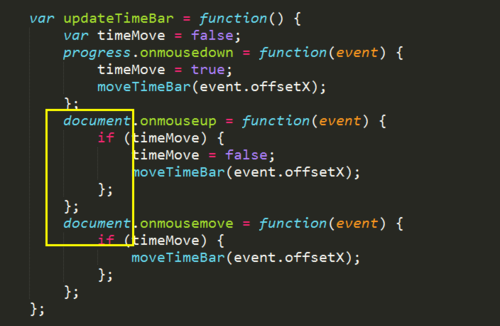
progress.onmouseup = function (event) {
if (timeMove) {
timeMove = false;
moveTimeBar(event.offsetX);
};
};
progress.onmousemove = function (event) {
if (timeMove) {
moveTimeBar(event.offsetX);
};
};
};
var moveTimeBar = function (x) {
var percent = 100 * x / progress.offsetWidth;
if (percent < 1 ){
percent = 0;
}
if (percent > 100){
percent = 100;
}
timeBar.style.width = percent + '%';
video.currentTime = video.duration * percent / 100;
};
updateTimeBar();
};
正在回答 回答被采纳积分+1




相似问题






登录后可查看更多问答,登录/注册
- 参与学习 人
- 提交作业 2198 份
- 解答问题 5012 个
如果你有web端基础,既想进阶,又想进军移动端开发,那就来吧,我们专题为你带来的课程有HTML5、CSS3、移动基础、响应式、bootstrap、less等,让你在前端道路上畅通无阻!
了解课程













恭喜解决一个难题,获得1积分~
来为老师/同学的回答评分吧
0 星